
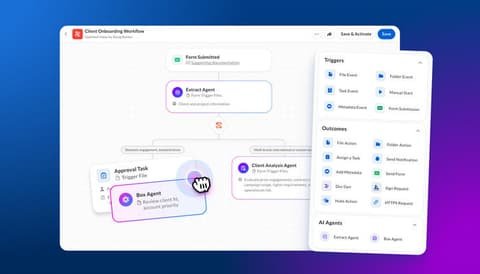
First impressions compound. A chaotic onboarding — missed emails, unclear next steps, the client wondering what they paid for — poisons the whole relationship. A smooth one builds trust that survives later hiccups. How to automate client onboarding with AI? The goal isn’t removing humans; it’s removing the administrative chaos so humans can focus on the relationship. Here’s the system.
How to automate client onboarding with AI: What Actually Works
Instant welcome: contract signed → automated welcome email within minutes (AI-personalized with the client’s name, project type, and what happens next). Speed signals professionalism. Intake forms that adapt: smart intake questionnaires — “tell us about your goals” — with AI follow-up questions that dig deeper based on answers. Static forms collect data; adaptive intake collects understanding. Document collection: automated checklist emails — “we need X, Y, Z to start” — with reminders that escalate politely. Chasing documents manually is toil; automate it.
Internal prep: AI synthesizes the intake into a client brief — “summarize this intake [paste] into: goals, scope, risks, key stakeholders, and 5 questions for the kickoff call.” You walk into kickoff prepared instead of reading the form live.
Phase 2: Kickoff and Early Delivery
Agenda generation: “Draft a kickoff call agenda for [client type]: introductions, goal alignment, process overview, timeline review, Q&A. 45 minutes.” Meeting notes to action: transcribe the kickoff, AI extracts decisions, action items, and deadlines — shared with the client within hours. Nothing builds confidence like “here’s what we agreed, in writing, same day.” Milestone communications: templated-but-personalized progress updates at each phase — “here’s what we completed, here’s what’s next, here’s what we need from you.” Clients who feel informed don’t micromanage.
Phase 3: Ongoing Relationship Automation
Check-in sequences: automated satisfaction pulses — “quick 2-question check: how’s it going? anything you need?” — with AI-drafted personal follow-up on concerns. Education drips: “Here’s how to get the most from [deliverable]” — reducing support load while increasing perceived value. Renewal/upsell timing: AI flags the right moments based on engagement and results — “client achieved X milestone; good time to discuss phase 2.”
Keeping the Human Touch (The Critical Balance)
Automate the predictable; personalize the meaningful. Welcome emails, reminders, status updates → automated. Kickoff calls, problem-solving, celebrations → human, always. The personal video: a 2-minute Loom from you in the welcome sequence — unscalable, unforgettable. Clients remember the human moments; automation handles everything else. Write automation in your voice: feed AI your past emails to match your tone — automation that sounds like you, not like a system. Escape hatches everywhere: every automated email has a clear “reply to talk to a human” — and replies get human answers fast.
The foundation for all of this: documented processes (automate what you’ve defined) and a trained knowledge base (so automated answers are accurate). For selling this as a service: selling AI workflows.
Measuring Onboarding Success
Automated onboarding needs metrics, or it silently degrades. Time-to-value: how long from contract signature to the client seeing first results? Track it per client; trend it quarterly. Faster time-to-value correlates directly with retention — clients who see wins early forgive later hiccups. Completion rates: what percentage of clients complete each onboarding step (intake form, document upload, kickoff attendance)? Drop-offs reveal friction — a 40% intake completion rate means the form is the problem, not the clients.
Early satisfaction: a 2-question pulse at day 14 — “how’s onboarding going? (1–5)” and “anything you need?” Scores below 4 trigger human intervention. Catch problems at day 14, not day 90 when they churn. Support ticket volume: good onboarding reduces “how do I…?” tickets. Track tickets per client in the first 30 days; falling trends mean the onboarding is teaching effectively. Referral timing: when do clients start referring? Great onboarding accelerates it — track days-to-first-referral as the ultimate onboarding metric.
The review ritual: quarterly, review all metrics + read a sample of automated communications with fresh eyes. Automation drifts — tone goes stale, links break, processes change. The 2-hour quarterly audit keeps the system sharp. The goal: onboarding so smooth clients mention it in testimonials. “The onboarding alone was worth it” — that’s when you know the system works.
Start this week: map your current onboarding on one page — every step from signature to first deliverable. Circle the steps that are pure administration (reminders, document collection, status updates). Those circled steps are your automation candidates. Automate one this week — the welcome email sequence is the easiest win. Measure time-to-first-value before and after. One automated step becomes two, then five — and within a quarter, your onboarding runs itself while you focus on the relationship.
The Takeaway
Automate onboarding in three phases: pre-kickoff (welcome, intake, prep), kickoff (agendas, notes-to-action, milestone updates), and ongoing (check-ins, education, renewal timing) — while keeping humans on relationships, problems, and celebrations. The result: clients who feel cared for by systems that never sleep, and humans free for the moments that matter.
Tooling: Loom for the personal video touch in automated sequences.



