A chatbot on your website that answers customer questions 24/7 — it sounds like an enterprise project, but in 2026 it’s a weekend project. Here’s how to build a simple AI chatbot for your website, from zero-code options to custom builds, with honest cost and effort estimates.
Option 1: No-Code Builders (Recommended for Most)
Platforms like Chatbase, CustomGPT.ai, Botpress, and SiteGPT let you build a working chatbot without writing code:
- Sign up and create a new chatbot.
- Add your knowledge: paste your website URL (it crawls it), upload PDFs (FAQs, manuals, policies), or paste text directly.
- Customize: set the bot’s name, personality, welcome message, and colors to match your site.
- Set guardrails: tell it what to do when it doesn’t know something (“offer to connect them with support” — never let it invent answers).
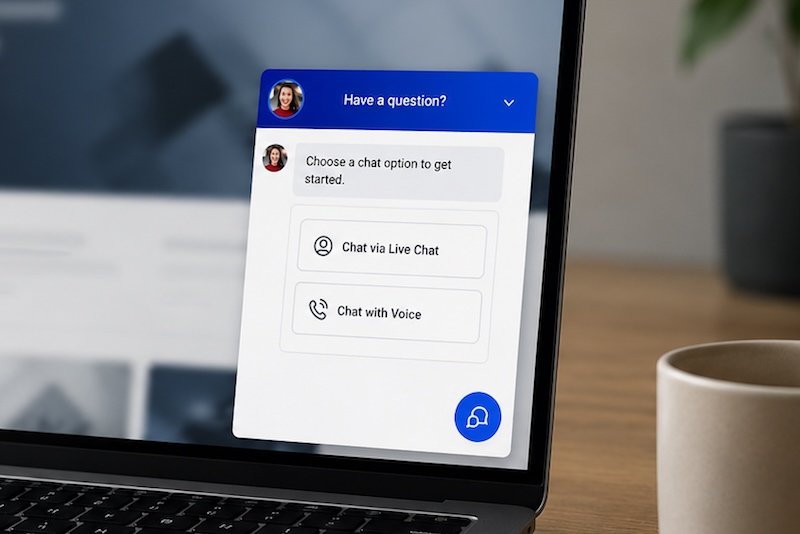
- Embed: copy the snippet and paste it into your site’s HTML. Done — usually a floating chat bubble in the corner.
Time: an afternoon. Cost: free tiers exist; paid plans typically $20-50/month. This handles 90% of small business needs — FAQs, lead capture, basic support.
Option 2: Platform-Native Bots
If you’re on WordPress, Shopify, or Wix, check your platform’s app store first. There are chatbot plugins with AI integrations that install in clicks and inherit your site’s styling. Less flexible than dedicated builders, but zero friction. For WordPress specifically, several plugins connect to OpenAI or Claude APIs with minimal setup.
Option 3: Custom Build (For Developers)
If you want full control — custom UI, your own logic, specific integrations — build it yourself:
- Frontend: a chat widget (build with React/Vue or use an open-source widget).
- Backend: a simple API endpoint that takes messages, adds your system prompt and retrieved context, calls an LLM API (OpenAI, Anthropic, or a local model), and returns the answer.
- Knowledge (RAG): embed your documents in a vector database; on each question, retrieve relevant chunks and include them in the prompt. This is what stops hallucinations — the bot answers from your docs.
Time: days to weeks. Cost: API usage (pennies per conversation for most sites). Full control over data, branding, and behavior. For the concepts behind the knowledge layer, see how to train an AI chatbot.
What Makes a Website Chatbot Good (vs. Annoying)
- Knows when to escalate. “I don’t know — let me get a human” beats a confident wrong answer every time.
- Answers from your content. A generic ChatGPT wrapper adds nothing; a bot grounded in your FAQs, pricing, and policies is genuinely useful.
- Captures leads gracefully. “Want me to have someone follow up? What’s your email?” — natural, not pushy.
- Doesn’t ambush visitors. A subtle bubble beats a popup that hijacks the screen after 3 seconds.
- Has a personality. Match your brand — a law firm’s bot and a skate shop’s bot should not sound the same.
Common Mistakes
- No fallback for unknown questions. The #1 failure mode. Plan the “I don’t know” path first.
- Stale knowledge. Update the bot’s sources when your content changes. A bot quoting last year’s prices is worse than no bot.
- No analytics. Review conversation logs weekly at first — you’ll find gaps in your content and bot blind spots fast.
- Overpromising. “Ask me anything!” sets you up for failure. “I can help with orders, shipping, and returns” sets the right scope.
Training Your Bot on the Right Content
A chatbot is only as good as its knowledge. Be deliberate about source material:
- FAQs: your actual customer questions, not what you think they ask. Pull from support tickets and emails.
- Product/service pages: pricing, features, policies — the factual core.
- Help docs and guides: how-to content the bot can walk users through.
- What to exclude: outdated pages, internal-only docs, anything you wouldn’t want quoted publicly. The bot will surface whatever you feed it.
Write a “bot persona” document too: how it should talk, what it must never claim, when to escalate, your brand voice. This becomes the system prompt — see how to write a system prompt for the technique. A bot with a clear persona feels like your team; without one, it feels like a generic demo.
Measuring Success (Metrics That Matter)
- Resolution rate: % of conversations resolved without human handoff. Target: 60-80% for FAQ-type bots.
- Escalation quality: when it hands off, does the human get context? (Transcript + summary = good; “user needs help” = bad.)
- User satisfaction: thumbs up/down after chats. Track trends, not absolutes.
- Top unanswered questions: the gold mine — these reveal content gaps on your site and bot knowledge gaps. Review weekly.
- Conversion assist: did chat users convert better? For sales-oriented bots, this is the metric that justifies the cost.
Scaling Up: From Simple to Sophisticated
Start simple, evolve based on data:
- Month 1: FAQ bot, watch the logs, fix the top failures.
- Month 2-3: add lead capture, expand knowledge, refine the persona.
- Month 3-6: add integrations (booking, order lookup, CRM) — the bot starts doing, not just answering.
- Ongoing: quarterly knowledge audits, persona refinements, new capabilities based on unanswered-question analysis.
The bots that succeed aren’t the fanciest — they’re the ones whose owners read the logs and iterate. Boring operational discipline beats clever technology every time. And if you outgrow the no-code tools, the concepts in how to train an AI chatbot guide the custom-build path.
The fastest way to evaluate the claims in this guide: try Anthropic’s Claude yourself and compare it against whatever you’re currently using.
Bottom Line
How to build a simple AI chatbot for your website? For most: pick a no-code builder, feed it your content, set the “I don’t know” fallback, embed the snippet — done in an afternoon. Go custom only when you need control the builders can’t give. Either way, ground it in your real content and review the logs. A simple, honest bot beats a fancy, hallucinating one every time.