
You don’t need to code to build a working AI agent in 2026. Here’s how to build your first AI agent with no code — from zero to a working agent handling a real task, in an afternoon.
How to Build Your First AI Agent No Code
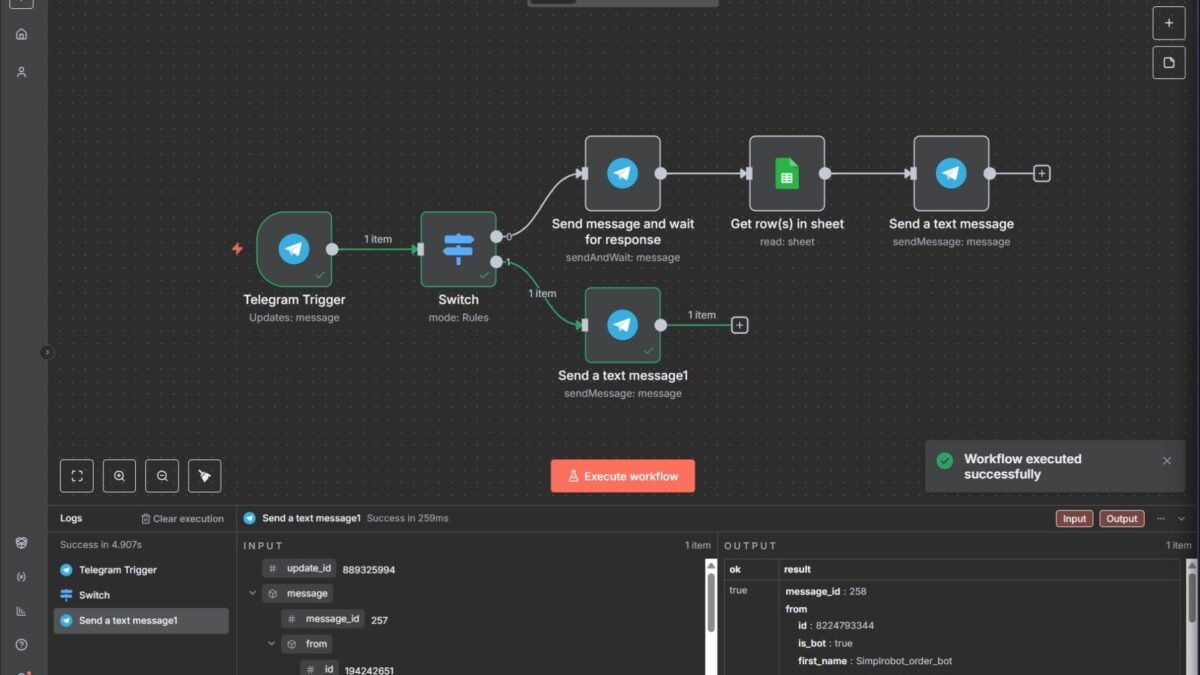
- n8n: open-source workflow automation with AI agent nodes. The power-user choice — self-hostable, huge integration library, real agent capabilities (tools, memory, branching). Slight learning curve, maximum flexibility.
- Make (Integromat): polished visual builder with AI modules. Easier than n8n, less agent-native.
- Zapier Agents: the simplest path — describe what you want in plain English, connect apps, deploy. Least flexible, fastest to working.
- Relevance AI / Lindy / Dust: purpose-built agent platforms — build agents via conversation, deploy to Slack/email/web. Great for specific use cases.
For your first agent, I’d recommend n8n (if you’re technical-curious) or Zapier Agents (if you want it working in an hour).
Choose the right first project
Your first agent should be: useful (you’ll actually use it), bounded (clear inputs, clear outputs), low-risk (no money movement, no external sends without review), and measurable (you’ll know if it worked). Perfect first projects: email triage and drafting, meeting-note summarizer, lead research assistant, content repurposer, daily briefing compiler.
Step-by-step: building it
- Define the job precisely. Write one paragraph: “When X happens, the agent should do Y and Z, then report to me via [channel].” Vague goals produce vague agents.
- Connect the tools. Authorize the apps the agent needs (Gmail, Calendar, Sheets, Slack…). Principle of least privilege — only what the task requires.
- Write the agent’s instructions. This is the “programming.” Be specific: role, goal, step-by-step process, what to do when uncertain (ask, don’t guess), output format, and hard boundaries (“never send emails without my approval”).
- Give it memory (if needed). For ongoing tasks, configure conversation memory or a simple database so it remembers context across runs.
- Test with real inputs. Run it 10 times on realistic scenarios. Watch every step. Fix the instructions where it goes wrong — 90% of agent quality is instruction quality.
- Deploy with supervision. Start with the agent drafting/suggesting while you approve. Loosen the leash only after consistent reliability.
- Monitor and iterate. Review logs weekly at first. Agents drift as inputs change; maintenance is part of the deal.
Common beginner mistakes
- Too broad a goal — “handle my business” fails; “triage my inbox” works.
- No error handling — what should it do when the API fails? Specify.
- Skipping the supervision phase — going straight to autonomous is how mistakes scale.
- Vague instructions — “be helpful” isn’t an instruction; write procedures.
Leveling up your first agent
Your first agent works — now make it good. The upgrades that matter most: better instructions (revisit your agent brief monthly; every failure teaches a refinement), more tools (add capabilities gradually — calendar access, database lookups, web search — testing each addition), memory (persistent context across sessions transforms one-shot tools into genuine assistants), and proactive behavior (scheduled runs that surface information before you ask — the morning briefing that arrives without prompting).
The reliability ladder: v1 works sometimes (demo), v2 works usually (useful), v3 works reliably (trustworthy), v4 works reliably and tells you when it can’t (professional). Most builders stop at v2; the value is in v3+. Each level requires the same work: more testing, better instructions, tighter scope. There’s no shortcut — but each level multiplies the agent’s real-world value.
When to graduate from no-code
Signs you’ve outgrown no-code: hitting platform limits (custom logic the visual builder can’t express), cost scaling (per-execution pricing exceeding self-hosted alternatives), needing version control (team development on visual workflows gets messy), or wanting custom models (fine-tuned or local models the platform doesn’t support). The graduation path: n8n self-hosted (still visual, more control), then Python frameworks (LangGraph, CrewAI) for full custom builds. Graduate when the pain justifies it, not before.
From tutorial to real: your next 30 days
Tutorials teach; real projects transform. Your 30-day plan: Week 1: rebuild the tutorial agent for your actual use case — real data, real stakes (low). Week 2: add one capability the tutorial didn’t cover (memory, a new tool, error handling). Week 3: deploy it supervised on live work; log every failure and fix the instructions. Week 4: measure — time saved, reliability rate, what you’d improve.
After 30 days you’ll have: a working agent, real operational experience, and the confidence that comes from production use. That’s more than 90% of people who “learned about AI agents” this year. The gap between knowing and doing is exactly 30 days of building. Start the clock.
Practical takeaway
- Use n8n, Zapier Agents, or a purpose-built platform — no code needed.
- First project: useful, bounded, low-risk, measurable.
- 90% of agent quality is instruction quality — write specific procedures.
- Deploy supervised first; autonomy is earned through reliability.
Keep exploring
If you found this useful, these related guides go deeper:



