
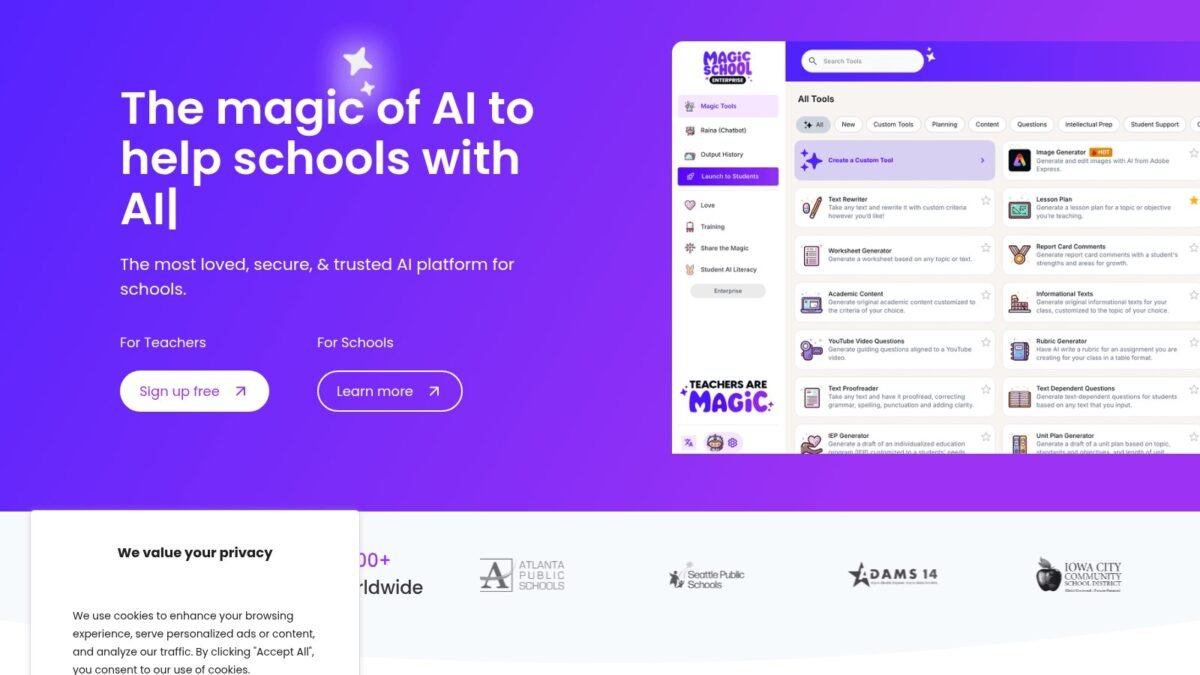
While everyone’s debating AI in education abstractly, millions of teachers quietly adopted a tool built specifically for them. What is MagicSchool AI and is it worth using? It’s the leading AI platform designed for educators — not a generic chatbot, but a toolkit of 60+ purpose-built tools for lesson planning, assessment, communication, and more. Here’s the honest review.
What is MagicSchool AI and is it worth using, Explained Clearly
MagicSchool provides role-specific AI tools: instead of prompting a blank chatbot, you pick “Lesson Plan Generator,” “Rubric Creator,” “IEP Goal Writer,” “Parent Email Drafter,” etc. Each tool asks for the relevant inputs (grade level, standard, topic) and produces structured output. There’s also Rain AI (their chatbot for open-ended tasks), student-facing tools (with teacher controls), and district admin features for school-wide deployment.
The key difference from ChatGPT: everything is pre-prompted for education. You don’t need prompt engineering skills; the tool knows what a lesson plan needs. For busy teachers, this removes the biggest barrier to AI adoption — the blank prompt box.
Is It Worth Using? The Honest Assessment
Where it excels
- Time savings are real. Teachers consistently report saving 5–10 hours weekly on admin work — lesson plans, rubrics, differentiation, emails.
- Built for education privacy. FERPA-conscious design, no student data used for training — addressing the privacy concerns that generic tools raise.
- Free tier is generous. The core tools are free for teachers, which matters enormously in education budgets.
- Low learning curve. If you can use a web form, you can use MagicSchool — critical for teachers starting from zero.
Where to stay sharp
- Output still needs review. Generated lesson plans are starting points, not finished products — you know your students; the AI doesn’t.
- Generic tools sometimes do more. For open-ended or unusual tasks, ChatGPT or Claude with good prompting can outperform the templated tools.
- Dependency risk. Like any platform, consider what happens to your workflow if pricing or terms change.
Who Should Use It
Definitely try it: classroom teachers drowning in planning, new teachers building their material library, and anyone who tried ChatGPT and bounced off the blank prompt. Maybe skip: teachers already fluent with general AI tools who’ve built their own prompt workflows — you might find the templates constraining. Districts: the admin tier is worth evaluating against your privacy requirements and existing edtech stack.
MagicSchool vs. General AI Tools: Detailed Comparison
Ease of use: MagicSchool wins decisively for beginners — structured tools with form fields versus the blank prompt box. A teacher who’s never used AI can generate a useful lesson plan in 3 minutes on MagicSchool; the same teacher faces a learning curve with ChatGPT. For experienced prompters, the gap narrows — experts can coax more from general tools.
Output quality: nuanced. MagicSchool’s templates produce consistently good education-structured output; general tools with skilled prompting can produce excellent output but also more variable results. Think: MagicSchool is a reliable B+ student; a skilled ChatGPT user gets A+ sometimes and C- others.
Privacy: MagicSchool’s education-specific design (FERPA-conscious, no training on student data) beats general consumer chatbots for school use. Enterprise tiers of general tools close the gap but cost more.
Flexibility: general tools win — they handle anything, while MagicSchool handles its 60+ tools’ domains. Unusual requests (“help me design an escape room review game”) favor the generalists.
Cost: MagicSchool’s free tier for teachers is generous; general tools’ free tiers are too, with $20/month adding more. The verdict for most teachers: start with MagicSchool for the structured wins, add a general tool as your prompting confidence grows. They’re complements, not competitors — and the combination covers everything.
Try this: sign up for the free tier and generate next week’s lesson plans with it — then honestly compare against your usual Sunday planning session. Track two things: time spent and quality of the result after your edits. Two weeks of real use on real work beats every review, including this one. The free tier costs nothing but an hour of experimentation.
Bottom line for the busy teacher skimming this: the free tier takes 10 minutes to try and the most common outcome is “where has this been all my career.” Skepticism is healthy; let a two-week trial on your real workload settle it.
One more consideration: involve your IT department early if you plan school-wide use. District data agreements and approved-tool lists protect everyone — and MagicSchool’s education focus usually makes that approval conversation much easier than it is for general AI tools.
The Takeaway
MagicSchool AI is worth using for most teachers — it’s the fastest path from “AI-curious” to “actually saving hours weekly,” with education-specific privacy design and a generous free tier. Treat its output as drafts to refine, not finished products, and it’s one of the highest-ROI tools in education. Try the free tier for two weeks on your real workload; that’s the only review that matters.
Official site: magicschool.ai — free for teachers.



