
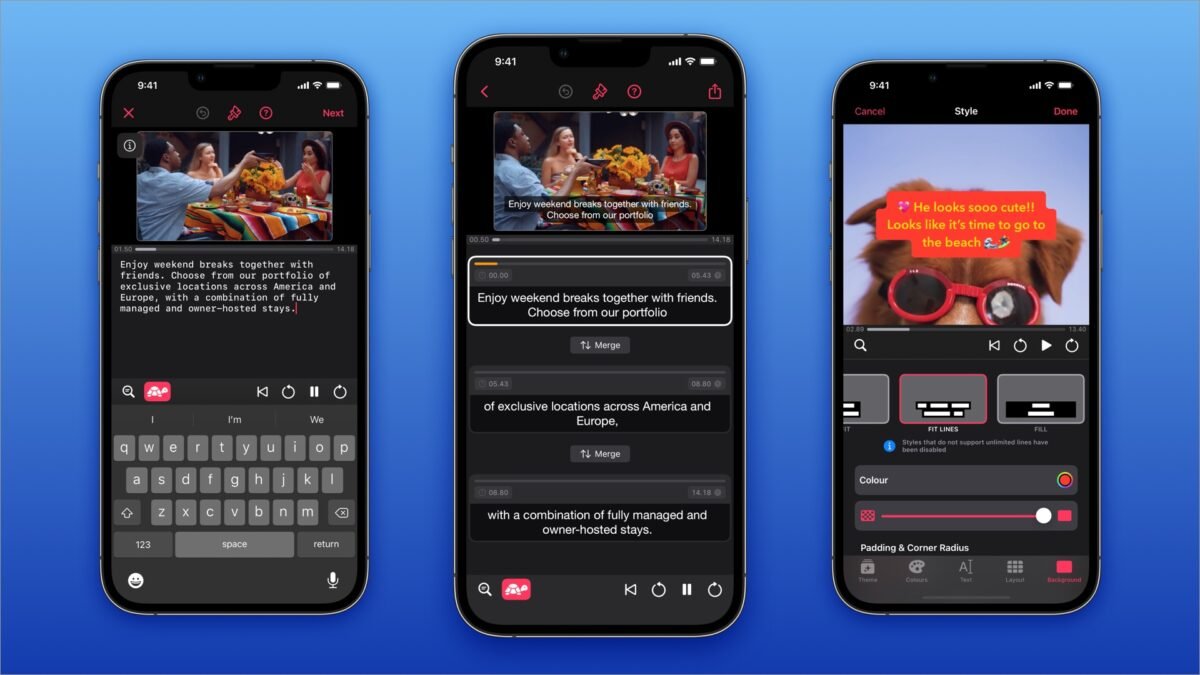
85% of Facebook videos are watched without sound. On TikTok and Reels, captions aren’t optional — they’re the difference between a view and a scroll-past. What is the best AI caption generator for creators in 2026? I’ve tested them on accuracy (does it hear words correctly?), style (do the captions look good?), and speed (how fast from upload to done?). Here’s the ranking.
What Matters in a Caption Tool
- Transcription accuracy — especially with accents, background noise, and fast speech
- Caption styling — word-by-word highlighting, animations, templates (the “Hormozi style” captions)
- Speed — minutes, not hours
- Editing ease — fixing the inevitable errors should be painless
- Platform optimization — vertical formats, safe zones, export options
The Best AI Caption Generators for Creators
1. Captions (App) — Best Overall
The Captions app remains the creator favorite: excellent transcription, beautiful animated caption styles, AI eye-contact correction and background tools as bonuses. It’s built for the vertical-video workflow — shoot, caption, post. The subscription is worth it if you publish regularly.
2. CapCut — Best Free Option
CapCut’s auto-captions are shockingly good for a free tool — accurate transcription, decent styling options, and it’s already where many creators edit. If you’re not paying for captions yet, start here. The accuracy on clear speech rivals paid tools.
3. Submagic — Best for Viral-Style Captions
Submagic specializes in the animated, word-by-word caption style that dominates TikTok and Reels — automatic emojis, keyword highlighting, dynamic templates. If your aesthetic is “high-energy short-form,” this is purpose-built for you.
4. Descript — Best for Long-Form + Podcast
Descript’s captions come with a full editing suite — edit video by editing text, remove filler words automatically, publish everywhere. Best when captions are part of a bigger production workflow rather than the whole job. Our podcaster tools guide covers it more.
Accuracy Reality Check
No AI transcriber is perfect. In my tests on varied content:
- Clear studio speech: 98%+ accuracy across all tools. Basically solved.
- Accented English: 90-95% — good, but review carefully.
- Fast/casual speech with slang: 85-90% — expect corrections.
- Background noise / music: 80-88% — clean your audio first if possible.
- Multiple speakers / crosstalk: the hardest case for all tools.
Always review captions before publishing — wrong captions are worse than no captions, especially for accessibility. For the transcription technology itself: AI transcription accuracy.
Caption Best Practices
- Word-by-word highlighting outperforms static captions for retention — the moving highlight keeps eyes locked.
- Keep captions in the safe zone — center-lower, away from platform UI overlays.
- Break lines for readability — 2-3 words per line, phrase-based breaks.
- Fix errors, especially names and key terms — wrong captions on your main point undermine credibility.
- Match your brand — font, color, and animation style should be consistent across videos.
Pairing With the Rest of Your Workflow
Captions are one piece of the creator AI stack: Shorts creation tools, the full YouTuber AI workflow, dubbing for global reach.
What Is the Best AI Caption Generator for Creators Who Post Daily?
Daily posters need a caption system, not just a tool. The system: a voice profile (3-5 of your best past captions fed to the AI as style reference), a hook library (your top-performing openers), and CTA rotation (alternate your calls to action so followers don’t go blind to them).
Generate captions in weekly batches — 7 to 14 at once, in one sitting. It is dramatically faster than one-at-a-time, and batching keeps your voice consistent across the week. Review and tweak each; never post raw output.
Track which captions drive saves and shares (not just likes). Feed winners back into your voice profile. This feedback loop — generate, post, measure, refine — is what separates creators whose captions convert from those just filling space. ChatGPT handles caption workflows well with a good style reference.
Hashtag strategy in 2026: fewer, more relevant tags beat hashtag stuffing. Three to five targeted tags that real people search outperform thirty generic ones. AI can suggest tags, but verify search volume — a tag nobody searches is decoration. Platform-native search bars are the fastest validation tool.
Write captions before creating the visual when possible — the message should drive the creative, not the reverse. Creators who caption-first produce more coherent content than those bolting text onto finished visuals.
Save your ten best-performing captions as templates: winning structures repeat. When a format works, reuse it with fresh content until it stops working.
End with a question occasionally: comments boost reach, and questions invite them. Engagement is a metric worth optimizing deliberately.
The Bottom Line
What is the best AI caption generator for creators? Captions app for the best overall experience, CapCut for free, Submagic for viral-style animated captions, Descript for long-form workflows. Whichever you choose: review every caption before publishing, style them for your brand, and remember — in 2026, uncaptioned video is invisible video.



