
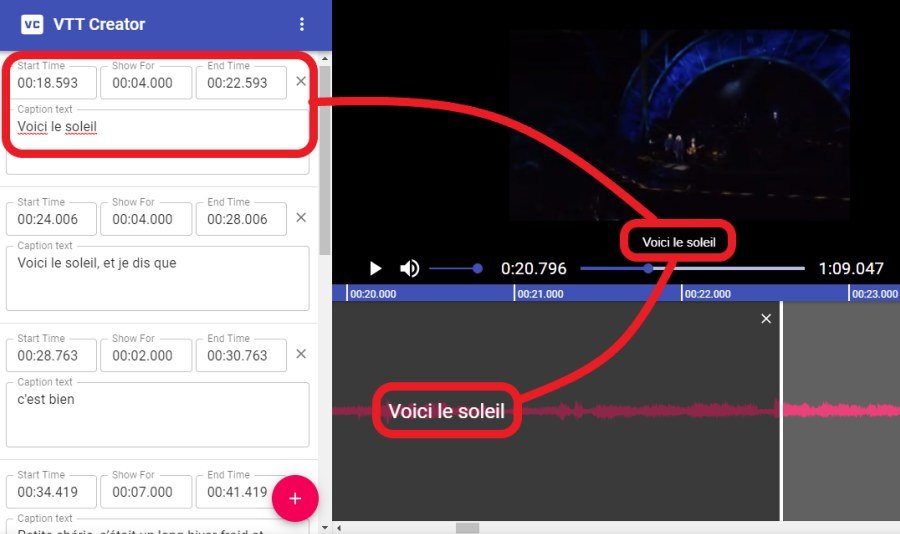
Learning how to translate video subtitles with AI is the fastest way to make your content accessible globally. Subtitles are the unsung heroes of video reach — they serve deaf and hard-of-hearing viewers, muted mobile watchers (the majority on social), language learners, and international audiences. AI now handles the entire subtitle translation pipeline — transcription, translation, timing, and formatting — in minutes. Here’s how to do it well.
Why AI Subtitle Translation Matters
The numbers make the case: videos with subtitles get significantly higher engagement and completion rates; translated subtitles open up audiences orders of magnitude larger than your native language; and platforms increasingly favor accessible content in ranking. Professional subtitle translation used to cost $5–15 per video minute with multi-day turnarounds. AI does it in minutes for pennies. For creators, it’s among the highest-ROI applications of AI, full stop.
How to Translate Video Subtitles With AI: The Workflow
Step 1: Generate accurate source subtitles
Translation quality starts with transcription quality:
- AI-transcribe your video — modern speech recognition is excellent for clear audio. Our dubbing guide (AI dubbing) covers the transcription-first approach in detail.
- Review and correct the transcript — proper nouns, technical terms, and unclear speech need human verification. Every transcription error propagates into every translated language.
- Format properly: reasonable line lengths (32–42 characters), logical breaks at phrase boundaries, timing synced to speech. Good source formatting makes good translations.
Step 2: Translate with context
Subtitle translation isn’t document translation — it has unique constraints:
- Provide context: “Translate these subtitles for a beginner cooking tutorial; keep tone warm and encouraging” beats bare translation.
- Respect reading speed: subtitles must be readable in their display time. Some languages expand 20–30% versus English — AI translation tools with subtitle awareness condense appropriately rather than overflowing.
- Handle cultural specifics: idioms, jokes, and references need localization. Flag these for special attention rather than literal translation.
- Maintain consistency: recurring terms, names, and concepts translated identically throughout. Provide a glossary for technical content.
- Batch efficiently: translate into multiple languages in one workflow rather than one at a time — the marginal cost per additional language is tiny.
Step 3: Time and format
- Preserve timing: translated subtitles should inherit the source timing, adjusted for reading-speed differences. Most AI tools handle this automatically — verify spot-checks.
- Format per platform: SRT for YouTube and most players, VTT for web, burned-in for social (where platform caption tools are limited). AI tools export all standard formats.
- Style appropriately: font, size, positioning, and background — readable across devices. Social platforms have their own caption aesthetics; match them.
- QC pass: watch with translated subtitles on. Timing glitches, overflow text, and encoding issues hide in files but show on screen.
Step 4: Upload and optimize
- YouTube: upload subtitle files per language — this also feeds YouTube’s search and discovery in those languages, a significant SEO benefit.
- Social platforms: use native caption tools where available; burn in where not.
- Your site/player: multi-track subtitles with language selectors for embedded videos.
Subtitle Translation vs. Dubbing: Choosing
- Subtitles win for: authenticity preservation (original voices kept), lower cost, faster turnaround, content where original audio matters (interviews, performances), and audiences that prefer originals.
- Dubbing wins for: younger audiences, entertainment content, markets with dubbing traditions, and accessibility for viewers who can’t read quickly.
- Many creators do both: subtitles as the baseline (cheap, fast, broad), dubbing for top-performing content in priority languages. Our dubbing guide details the full pipeline.
Quality Levels and When Each Suffices
- AI-only (no review): acceptable for casual content, internal videos, and rapid publishing where speed matters most. Quality is good and improving.
- AI + spot-check: review flagged uncertainties and key sections. The sweet spot for most creators — 95% of the quality at 10% of the traditional cost.
- AI + professional review: native-speaker review of AI translations for brand-critical, legal, or high-visibility content. Still far cheaper and faster than traditional translation.
- Match the investment to the stakes: a casual vlog needs less review than a medical education video. Calibrate accordingly.
Common Pitfalls
- Skipping transcript review: garbage in, garbage out — in every language simultaneously.
- Ignoring reading speed: accurately translated but unreadably fast subtitles help no one.
- Encoding issues: non-Latin scripts need proper UTF-8 handling. Test on target devices.
- Forgetting SEO benefits: translated subtitles and metadata multiply discoverability — upload them properly instead of burning in only.
- One-and-done mentality: languages evolve, tools improve. Revisit translations for evergreen content periodically.
See also: synchronized audio and dialogue in AI videos.
For more background, see YouTube’s official site.
The Takeaway
AI subtitle translation turns every video into a global asset: transcribe accurately, translate with subtitle-aware context, time and format per platform, and upload properly for the SEO benefits. Match review investment to content stakes, consider dubbing for priority markets, and never skip the transcript QC that everything else depends on. In a world where most viewing happens muted and billions don’t speak your language, translated subtitles aren’t a nice-to-have — they’re the highest-leverage few minutes in your production workflow.



