
Do professional developers use AI coding tools? Short answer: yes, overwhelmingly. The longer answer is more interesting — because how senior engineers use these tools looks nothing like the “AI writes all my code” fantasy sold on social media. I’ve worked with teams across startups and enterprises, and the pattern is remarkably consistent.
Do Professional Developers Use AI Coding Tools — What the Data Says
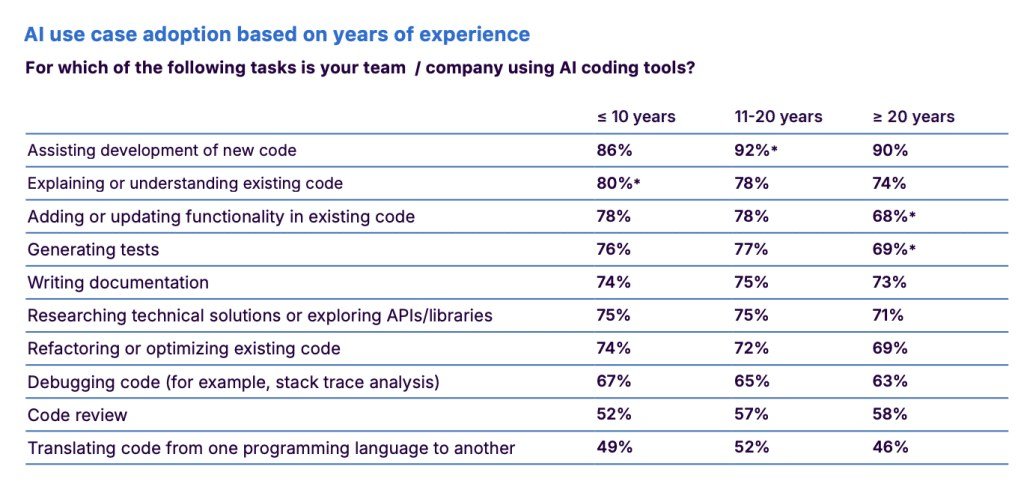
Multiple developer surveys (Stack Overflow’s annual survey, GitHub’s research) now show a clear majority of professional developers using AI coding assistance weekly, with a large chunk using it daily. This isn’t a junior-dev phenomenon either — senior engineers report some of the heaviest usage, because they know exactly how to direct the tool and verify its output.
What they actually use it for
- Boilerplate and scaffolding. The boring 40%: CRUD endpoints, config files, test fixtures, regex patterns. This is the undisputed killer use case.
- Debugging partner. Pasting a stack trace and asking “what could cause this” — seniors use it as a second pair of eyes, not an oracle.
- Learning unfamiliar codebases. “Explain what this module does” on legacy code they inherited. Huge time saver.
- Writing tests. Generating test cases from existing code — then reviewing every one.
- Docs and commit messages. The stuff everyone skips, now done in seconds.
What they DON’T do
No senior dev I know lets AI architect a system unsupervised, commit without review, or touch security-sensitive code without scrutiny. The professional workflow is: AI drafts, human decides. The tool is a very fast junior dev with no judgment — and seniors treat it exactly that way.
The Real Productivity Question
How much is actually AI-written? Estimates vary wildly, which is why how much code developers write with AI now deserves its own honest breakdown. The honest version: for greenfield boilerplate-heavy work, AI touches a lot. For complex systems work, it’s an assistant, not an author. Teams report 20–40% time savings on suitable tasks — meaningful, not magical.
How Team Policies Are Evolving
Individual developers adopted AI tools fast; companies are catching up with policies, and the policies reveal what organizations actually worry about. The common enterprise stance in 2026: approved tools only (usually Copilot, Cursor, or an internal model), no proprietary code in public chatbots, and AI-generated code goes through the same review process as human code — sometimes a stricter one.
What’s interesting is what’s NOT in most policies: nobody serious is banning these tools anymore. The competitive math killed that idea — a team with AI assistance genuinely ships faster, and banning it is unilateral disarmament. Instead, the conversation shifted to data governance: which tools, what data they can see, where the data goes. That’s why whether tools train on your code became a procurement question, not just a developer curiosity.
If you’re a developer at a company without a policy yet, the safe defaults are: use the company-approved tool, don’t paste secrets or customer data into anything, and disclose AI assistance on significant contributions. And if you’re the one writing the policy — focus on data flow, not prohibition. Your developers are already using these tools. The policy just decides whether they do it safely or secretly.
The Skeptics’ Case (Steelmanned)
Not everyone’s convinced, and the skeptics have real points. Skill atrophy: developers who lean hard on autocomplete report feeling rusty on fundamentals — and they’re probably right. Code homogenization: if everyone’s AI suggests the same patterns, codebases converge on the average, and genuinely novel solutions get rarer. Review theater: the risk that “reviewed” becomes a rubber stamp as AI-generated diffs get larger and reviewers get tireder.
Legal fog: the training-data lawsuits aren’t settled, and some companies restrict AI tools over IP concerns. These aren’t crank objections — they’re the reasons thoughtful teams pair adoption with discipline: regular no-AI coding to keep skills sharp, deliberate review standards, and clear policies. The professionals who thrive with these tools aren’t the enthusiasts or the refuseniks. They’re the pragmatists in the middle who took the skeptics seriously and built guardrails accordingly.
The bottom line for your career: learn these tools the way you’d learn a new IDE — as leverage, not identity. The developers who stay valuable are the ones whose judgment improves while their typing decreases. Tools change; judgment compounds.
One more honest signal: watch what senior engineers do during production incidents. The AI gets closed, the fundamentals come out. That tells you everything about where the real skill lives — and why the tool is leverage for the skilled, not a substitute for skill itself.
The Takeaway
Yes, professionals use AI coding tools — heavily, pragmatically, and with verification. The skill that separates them isn’t prompting; it’s knowing what’s worth automating and what’s worth thinking through yourself. New to this? Start with the security basics in using AI coding assistants securely at work, and understand whether these tools train on your code before pasting anything sensitive.
Data point: Stack Overflow’s developer survey tracks AI tool adoption yearly — worth a look for the hard numbers.



