
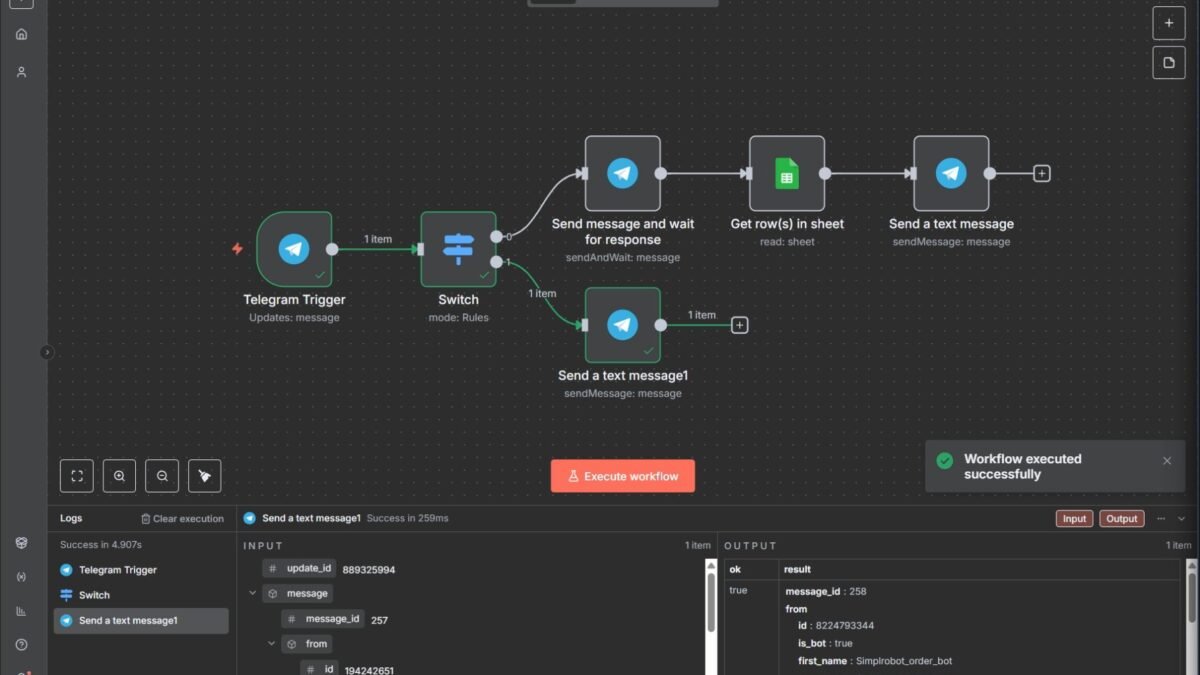
If you’re serious about AI automation, you’ll keep hearing one name: n8n. So what is n8n and how do you use it for AI automation? Here’s the complete picture.
What is N8n and How to Use it for AI Automation
n8n (pronounced “n-eight-n”) is a workflow automation platform — visual, node-based, connecting apps and services into automated workflows. What makes it special in 2026: it’s open-source and self-hostable (run it on your own server, own your data, no per-task pricing games), it has native AI agent nodes (not just “call an API” — real agent loops with tools, memory, and reasoning), and it offers 400+ integrations plus HTTP/code nodes for everything else.
n8n vs. the alternatives
- vs. Zapier: n8n is far more powerful (branching logic, code, self-hosting, AI agents) and cheaper at scale; Zapier is simpler for basic zaps and has more hand-holding.
- vs. Make: similar visual power; n8n wins on self-hosting, AI-native features, and cost; Make has a slicker UI for pure visual builders.
- vs. code (Python/LangChain): n8n is 10x faster for standard workflows; code wins for truly custom logic. Many teams prototype in n8n, then harden critical paths in code.
Getting started
- Install: Docker is easiest (
docker run -d -p 5678:5678 n8nio/n8n), or use n8n Cloud to skip hosting. For AI work with local models, self-host. - Learn the anatomy: workflows are node chains — triggers start them (schedule, webhook, app event), action nodes do things, AI nodes think. Data flows between nodes as JSON.
- Build your first workflow: something simple like “when a form submits → AI summarizes → save to Sheets → notify Slack.” This teaches triggers, AI nodes, and data flow in 30 minutes.
- Add an AI agent: the AI Agent node with tools (other nodes as tools), memory, and a system prompt. This is where n8n goes from automation to agency.
AI automation patterns in n8n
- Triage agents: email/support intake → AI classifies → routes or drafts responses.
- Research agents: trigger → web search/scrape → AI synthesizes → delivers briefing.
- Content pipelines: input → AI drafts → human approval step → publishes across platforms.
- Data enrichment: new lead → AI researches → scores and enriches → updates CRM.
- RAG assistants: connect vector stores (Pinecone, Qdrant, Supabase) for agents that answer from your documents.
Tips from production use
- Use the human-in-the-loop: approval steps (Gmail/Telegram nodes) before consequential actions.
- Log everything: execution history is your debugging superpower.
- Version your workflows: export JSON backups; you’ll thank yourself later.
- Start with OpenAI/Anthropic, migrate to local once workflows are stable — connect local LLMs to n8n to cut costs.
- Respect rate limits: add waits and batching; hammering APIs gets you banned.
n8n in production: hard-won lessons
Tutorials show the happy path — here are the production realities. Self-hosting ops matter: backups (workflow JSON exports + database dumps, automated), updates (test on staging first — n8n updates occasionally break things), monitoring (know when workflows fail before your boss does), and scaling (queue mode with workers for high volume; the default single-process setup hits walls). Credentials management: use n8n’s credential store properly, rotate regularly, never hardcode secrets in Code nodes.
Error handling is not optional: every production workflow needs error branches — what happens when the API is down, the data is malformed, the AI hallucinates? Design for failure and you’ll sleep well. Version control: export workflow JSON to git; diff before deploying changes; you will need to roll back someday. Documentation: future-you won’t remember why that IF node exists — annotate generously.
n8n community and resources
The n8n community forum is genuinely excellent — search before asking, share your solutions back. The template library (thousands of workflow templates) is the fastest way to learn patterns. And n8n’s own YouTube channel covers advanced techniques well. Production n8n is a craft; the community is your apprenticeship.
Your n8n learning path: 30 days
Structured plan from zero to competent. Week 1: basics — install, build 5 simple workflows from templates, understand triggers/nodes/data flow. Week 2: logic — IF nodes, loops, merging, error handling, Code nodes for custom logic. Week 3: AI — LLM chains, the AI Agent node, tools, memory, RAG basics. Week 4: production — a real workflow deployed with monitoring, documentation, and error handling.
Daily habit: 45 minutes of building (not watching tutorials — building). Weekly: share one thing you learned in the community forum. After 30 days you’ll be more capable than most “automation experts” selling services — because you’ll have built real things, not just watched videos. The n8n skill compounds fast; the first month is the steepest and most valuable.
Practical takeaway
- n8n = open-source, self-hostable automation with native AI agent capabilities.
- More powerful and cheaper at scale than Zapier; AI-nativer than Make.
- Learn: triggers → nodes → AI agent with tools → human approval steps.
- Prototype in n8n fast; harden critical paths in code later if needed.
Keep exploring
If you found this useful, these related guides go deeper:




1 Comment