
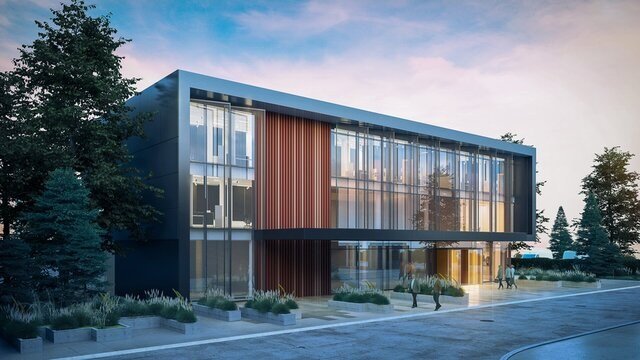
Architectural visualization used to be a bottleneck. You’d wait days (or weeks) for a render farm to produce a handful of views, each revision costing time and money. The best AI for architectural visualization in 2026 hasn’t eliminated that craft, but it has completely changed the early stages — concepting, massing studies, and client presentations now happen at a speed that would have seemed absurd three years ago. The question we answer here: what is the best AI for architectural visualization.
I’ve watched architects go from skeptical to quietly dependent. The pattern is consistent: AI takes over the “what if” phase — the dozen quick iterations that used to be too expensive to explore — while the final hero renders still get the traditional treatment. The result is better designs, not just faster ones, because architects can actually explore the option space.
What is the best AI for architectural visualization?
What AI arch-viz tools do well right now
Sketch and massing to rendered image
This is the headline workflow. Feed in a rough massing model, a sketch, or even a text description of the building, and get back a photorealistic render in a chosen style — dusk exterior, aerial view, street-level perspective. The best tools preserve your geometry while transforming the visual treatment, which is the crucial bit: it’s still your design, just visualized instantly.
Style and atmosphere exploration
Want to see the same courtyard in brutalist concrete, warm timber, and glass curtain wall? That used to be three separate render commissions. Now it’s an afternoon. Clients love it, and it shortens the most painful part of practice — the “I’ll know it when I see it” loop — dramatically.
Interior views from floor plans
Closely related to AI for interior design mockups, several tools now generate plausible interior perspectives from plans or simple 3D massing. They’re not construction-accurate, but for early client buy-in they’re transformative.
Site context and entourage
The fiddly stuff — populating streets with people, adding realistic skies, aging materials, generating context buildings — is exactly the kind of tedious work AI devours. What took a visualization artist a day of Photoshop now takes minutes.
The tools and approaches worth knowing
- ControlNet-style workflows: The technical backbone of serious AI arch-viz. By constraining generation to your actual geometry (depth maps, edges, segmentation), tools built on this approach keep windows where windows are. If photorealistic accuracy matters, this is the category to learn — and checkpoint models for realistic photos covers the model side.
- Integrated design platforms: Several architecture software vendors now ship AI rendering natively — one click from your BIM model to a rendered view. Less control than dedicated tools, but zero pipeline friction.
- Text-to-image for concepting: For the earliest “what could this be” phase, general image models are still unmatched for speed and surprise. Many firms use them purely for internal ideation, never client-facing.
What AI still gets wrong (and why architects still matter)
Let’s be blunt about the limits. AI renders routinely botch structural logic — impossible cantilevers, stairs to nowhere, mullions that defy physics. It doesn’t understand building codes, constructability, or cost. It will happily render a gorgeous facade that can’t be built for ten times the budget. And there’s a growing sameness problem: uncritical AI use is producing a recognizable “AI architecture” aesthetic — all soft dusk light and suspiciously perfect landscaping — that discerning clients are starting to notice.
The architects thriving with these tools treat AI as the world’s fastest sketch artist, not as a designer. The judgment about what to build, why, and for whom remains entirely human. Traditional architectural rendering craft — lighting as storytelling, composition, material honesty — matters more, not less, when the baseline is automated.
Practical advice for firms adopting now
Start with client presentations, where the speed advantage is most visible and the accuracy stakes are lowest. Build a small library of prompts and settings that match your firm’s visual style — consistency across projects is what separates professional output from generic AI slop. Train one person properly on the ControlNet-style workflow rather than having everyone dabble. And be transparent with clients about what’s a concept image versus a final render; managing that expectation early prevents painful misunderstandings later.
The economics are shifting
Worth noting what this does to pricing: rapid AI concepting is collapsing the cost of early-stage visualization while increasing its volume — firms produce ten times the views at a fraction of the per-image cost. Smart firms aren’t pocketing all the savings; they’re reinvesting in more design iterations (better buildings) and keeping final hero renders as the premium craft product. If you’re a client, expect faster turnarounds and more options. If you’re a visualization artist, the message is clear: the commodity middle is being automated, while taste, storytelling, and the final 10% of polish become more valuable. Move upmarket or get comfortable with the new tools — the middle ground is disappearing.
The economics are shifting too — visualization is becoming a smaller line item while design iteration becomes the value center, which is reshaping how firms price and staff. If you’re curious about the money side of the AI boom, AI engineer salaries tell an interesting story about where the market values technical AI skill right now. OpenAI‘s image models power much of this space under the hood, but the real differentiator in arch-viz is the control layer on top — geometry-aware generation is what makes it a professional tool rather than a toy.



