
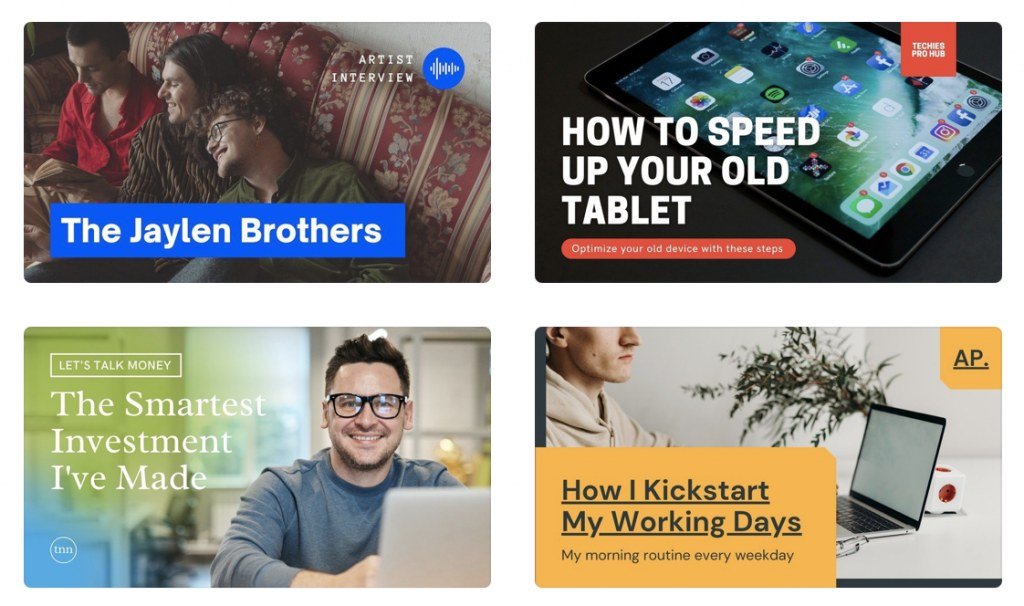
Your thumbnail decides whether your video gets watched. Not your title, not your content — the thumbnail. Creators obsess over it for good reason: a 2% CTR difference is the gap between viral and invisible. What is the best AI thumbnail generator for YouTube in 2026? I’ve tested the tools and studied what actually gets clicks. Here’s the full guide — tools plus the design principles that matter more than any generator.
What Makes Thumbnails Get Clicks
Before tools, the principles (from analyzing thousands of high-CTR thumbnails):
- One clear focal point. A face with strong emotion, or one striking object. Not five things.
- 3 words max. Thumbnails are glanced at, not read. If your thumbnail needs a sentence, redesign it.
- High contrast. Must pop at tiny sizes on a phone screen. Test at 10% size — if it’s muddy, it fails.
- Emotion and curiosity. Surprised faces, before/after, questions raised but unanswered.
- Brand consistency. Viewers should recognize your thumbnails in a feed.
- Title-thumbnail synergy. They should complement, not duplicate. Title says what, thumbnail shows why-care.
The Best AI Thumbnail Generators
1. Midjourney / GPT Image + Canva — Best Quality Combo
Honest answer: the best “AI thumbnail generator” is a two-step workflow. Generate a striking background or concept image with AI (Midjourney for drama, GPT Image for precise compositions), then add text, faces, and branding in Canva or Photoshop. This beats every one-click thumbnail tool on quality — because thumbnails need your face, your branding, and precise text, which pure AI fumbles.
2. Thumbnail-Specific AI Tools — Best Speed
Several tools now specialize in YouTube thumbnails: AI background generation, face enhancement, CTR prediction scores. They’re fast and the good ones produce solid results. Best for high-volume creators who need 5 thumbnails a week without a designer.
3. Canva Magic Studio — Best Integrated
Canva’s AI features (background removal, Magic Edit, text effects) inside the design tool most creators already use. Not the most advanced AI, but the workflow — design + AI assists in one place — is efficient. Great for creators who design their own thumbnails.
The AI Thumbnail Workflow That Works
- Concept first: what’s the one emotion/idea? (You decide — AI can’t.)
- Generate the base: AI image for background or dramatic element.
- Add the human: your face with strong expression (AI faces in thumbnails underperform real faces — viewers connect with people).
- Text: 1-3 words, huge, high contrast. Add manually for precision — see our text-in-image guide.
- Test at small size: the phone-feed test. If it doesn’t pop tiny, redesign.
- A/B test: YouTube’s test-and-compare feature. Let data pick winners.
Common Thumbnail Mistakes (AI Makes These Worse)
- Too much text. AI loves adding paragraphs. Three words. Max.
- Generic stock look. Pure-AI thumbnails have a recognizable sheen now — viewers scroll past “AI-looking” thumbnails.
- No face. Faces outperform non-faces in most niches. The data is clear.
- Clickbait mismatch. Thumbnail promises what video doesn’t deliver = high CTR, terrible retention, algorithm punishment.
- Inconsistency. Random styles confuse subscribers. Develop a recognizable look.
For the video side: how YouTubers use AI, faceless niches, Shorts tools.
What Is the Best AI Thumbnail Generator for YouTube: CTR Testing Method
Generating thumbnails is easy; knowing which one wins is the skill. The method: for each video, generate five to eight variants, then test. YouTube’s built-in testing (Test and Compare) shows different thumbnails to different viewers and reports the winner — use it on every important video.
What to vary across variants: facial expression, background color, text versus no text, close-up versus wide. Change one element at a time when you are learning what your audience responds to; once you know, combine winners.
Keep a swipe file of your highest-CTR thumbnails and feed them to the AI as style references. Over months, you will develop a thumbnail style that is recognizably yours — and the data will tell you exactly why it works. Midjourney remains a strong option for high-impact thumbnail imagery.
Text overlays on thumbnails: three words maximum, high contrast, readable at tiny sizes. Test readability by shrinking the thumbnail to stamp size — if you cannot read it, neither can a mobile scroller. Most thumbnail text fails this test; the winners are ruthlessly simple.
Update your best-performing thumbnails yearly: design trends shift, and a refresh can revive click-through on evergreen videos. Your analytics will tell you which videos deserve the facelift.
Screenshot your analytics when a thumbnail wins big: build a personal case-study library. Documented wins guide future designs better than memory.
The Bottom Line
What is the best AI thumbnail generator for YouTube? The AI-image-plus-Canva workflow for the best quality, specialized thumbnail AI tools for speed, Canva Magic Studio for integration. But remember: the generator is maybe 20% of a great thumbnail. The concept, the face, the 3-word text, and the small-size test are the other 80% — and those are human decisions. AI accelerates thumbnail production; it doesn’t replace thumbnail judgment.



