
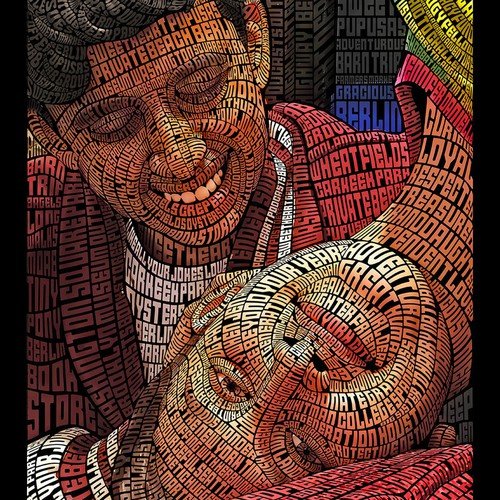
Curious how to make AI images with hidden text? Whether you want to embed secret messages in artwork, create puzzle images, add steganographic watermarks, or just understand the technique for detection purposes — hiding text inside AI-generated images is a fascinating intersection of art and information security. Here’s how it works, from simple visual tricks to real steganography.
What “Hidden Text” Means (Three Different Things)
People mean different things by hidden text, and the techniques differ completely:
- Visually hidden text: text concealed within the image’s design — camouflaged in patterns, visible only at certain angles or when highlighted. Artistic and puzzle-oriented.
- Steganographic text: data encoded invisibly in pixel values — truly hidden, recoverable only with the right tool and key. The information-security approach.
- AI-“hidden” text: asking the image generator to include text that’s subtle, partial, or integrated into the scene — more about aesthetic integration than secrecy.
How to Make AI Images With Hidden Text: The Techniques
Method 1: Prompted camouflage (visual hiding)
Ask the generator to integrate text into the scene’s textures: “a forest scene where the bark patterns subtly form the word ‘HIDE’,” “city skyline at night where lit windows spell ‘SECRET’.” Results vary — current models handle this inconsistently, succeeding more with simple words and bold integration. Tips: keep hidden words short (3–6 letters), request high contrast between text and background elements forming it, and generate multiple variations. Our guide to readable AI text covers the text-rendering fundamentals that apply here.
Method 2: Post-generation steganography (true hiding)
For genuinely hidden, recoverable messages:
- Generate your AI image normally — any image works as a carrier.
- Use steganography software (open-source tools like OpenStego, or Python libraries) to embed your text in the image’s pixel data — typically in the least significant bits, invisible to viewers.
- The result looks identical to the original but contains your hidden message, extractable with the same tool and password.
Capacity is generous: a 1024×1024 image can hide kilobytes of text invisibly. Use PNG format (lossless) — JPEG compression destroys steganographic data. This is the method for watermarking, secret communication, and puzzle hunts with verifiable solutions.
Method 3: AI-assisted puzzle design
For escape rooms, ARGs, and puzzle content: generate atmospheric images, then manually integrate hidden text through design — UV-reactive style reveals (text visible only when brightness is adjusted), negative-space lettering, or text hidden in reflections and shadows via inpainting (our guide: inpainting). The AI creates the canvas; you design the concealment with intent.
Method 4: Metadata messages
The simplest “hidden” text: embed messages in the image’s metadata (EXIF comments, PNG text chunks). Invisible in normal viewing, readable with metadata viewers. Not secure (trivially stripped), but perfect for easter eggs, credits, and playful hidden notes.
Legitimate Uses
- Watermarking and provenance: invisible ownership marks — our watermarking guide (watermarking AI images) details the professional applications.
- Puzzle and game design: hidden clues in promotional art, ARG content, escape room materials.
- Secure communication: steganography has legitimate privacy uses, from journalists protecting sources to individuals evading surveillance.
- Artistic expression: hidden messages as a conceptual art element — the reveal as part of the experience.
- Copyright traps: unique hidden identifiers proving an image’s origin in disputes.
Limitations and Ethics
- Steganography isn’t encryption. Hidden isn’t the same as secure — sophisticated analysis can detect steganographic content. For truly sensitive communication, encrypt before hiding.
- Platform processing destroys hidden data. Social media recompression wipes steganography and metadata. Hidden messages survive only in directly-shared original files.
- Don’t hide text to deceive. Concealing misleading content, evading moderation, or embedding malicious instructions crosses ethical and often legal lines. The techniques are neutral; applications aren’t.
- AI text rendering limits apply. For visually-hidden text (Method 1), you’re fighting the same text-generation weaknesses as normal AI typography — keep it simple.
Testing Your Hidden Text
Whatever method you use, verify it works before relying on it. For visual hiding: show the image to someone without telling them about the text — if they can’t find it, it’s hidden; then tell them and confirm they can find it (hidden shouldn’t mean impossible). For steganography: extract the message on a different machine to confirm the workflow is reproducible, and test that your sharing method preserves it (email attachments usually do; social media uploads don’t). For metadata: check with an independent metadata viewer. Untested hiding is just hoping.
For more background, see Wikipedia’s generative AI overview.
The Takeaway
Hiding text in AI images ranges from artistic camouflage (prompt it into the scene) to true steganography (encode it in pixels afterward) to simple metadata notes. Match the method to your goal: visual puzzles want designed concealment, secret messages want steganographic tools, and easter eggs just need metadata. Understand what each method protects against — and what it doesn’t — and you’ll use the right technique for the job. And document your method — future-you (or your collaborators) will need to know how the message was hidden to retrieve it.



